New technologies fascinate me, the one that has me fascinated at the moment is Docker a new type of virtual environment solution, or so I thought before starting my journey. I quickly learnt it could be so much more than that.
So to get started I had found Docker’s own e-courses. Self Paced - Free.
What I’ve learnt so far:
Instead of having to have server with a hypervisor loaded onto like VMWare or alike, it can just run on a base image of a Linux Distro - which can be hosted on a VMWare instance, or run off a cheap VPS. It also is going to come pre-installed on Windows Server 2016… that pretty mind blowing. Microsoft accept more and more open source.
To install Docker it’s as simple as running a wget and piping that to a shell script… CRAZY.1
wget https://get.docker.com/ | sh
Once it’s installed you should look at the basics of what it can do. For my system I’ve got a Ubuntu VM running on a VPS, this is so I don’t have to run it on my local machine. So can do normal VM stuff on this VM it took probs 15 minutes to setup the VM.
With this simple command I install a new Ubuntu image onto of the current Ubuntu and run a simple bash shell….1
docker run -it ubuntu bash
Now you have a vm inside a Docker container running bash… and it took seconds to run! seconds!!!
When you finished with the command it kills the instance of the command so it runs for only the time you need it and only consumes the resources to just execute what you wanted to do. To make the application run for a set period of time or until you’re done with it you need the flags - -d (detached mode - so you can (run in background)) -P (port forwarding, maps containers required ports to the host ports)
All the containers are setup easily and simple by running containers that you can simple pull down from Dockers Hub. Docker Hub. All images can be edited and set up to be pulled from the public repository or your own private repository.
The have images that are just containers that have a single application installed on them, i.e Java, Nginx. They have containers that have more than a single application on them i.e Ubuntu or Centos. The options for this is endless or that’s the feeling I’m getting just from this brief experience with them.
Now you’re like what can I do with Docker?
easy want to run up a simple webserver is seconds and its just hosted of a simple VM and you don’t need worry about the settings files and which ports you need: Run this -1
docker run -d -p 80:80 --name webserver nginx
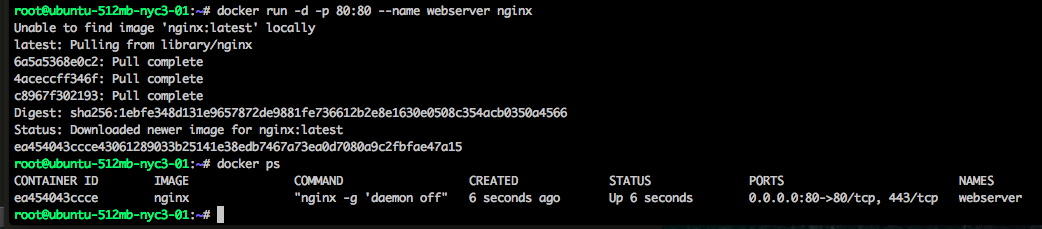
To check on what docker is currently running1
docker ps
Now you can also see from that the ports that are forwarded to your host to make the containtered process / application work from the web:
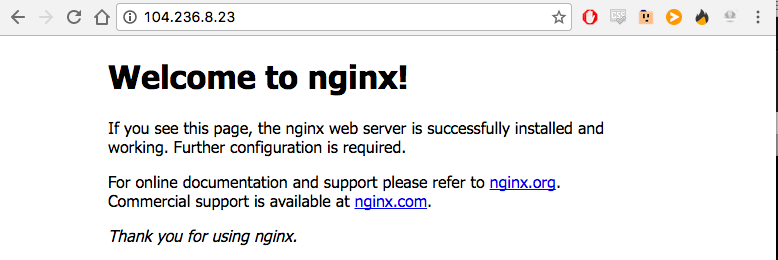
Once you have finished with it you will need the dockers Container ID and run1
docker stop <container id>
(the id can be found from the docker ps command)
Want to see what containers you have run? simple1
docker ps -a

Well these are all the basic things I’ve found out about Docker and its fascinating me so much I will be continuing this as a series on this weekend.
Next step is working out how to make own images that will be easily deployable and understand what needs to go into the images that I pulled off Dockers Hub.